
I Tested the Base M6 Mac mini for Local AI, Then Returned It
A while back I picked up the base M6 Mac mini: 16 GB of memory, 256 GB of storage, the cheapest one they sell. I speed ran it from the box to a local AI chat, and it worked. But loading a model and doing something useful are two very different things. So I gave it real work, kept every result including the failures, and then ran the same models on my Mac Studio M5 Max with one hand tied behind its back.
How I tested it
I'm not a benchmarking guy. This is a hobby, so take all of this with a grain of salt. But every number here is from my own runs.
An AI agent set up the harness and ran it overnight on November 3 to 4, 2026, a little over 1,200 requests across chat, writing, a code fix, documents, transcription, images and video edits. A frontier model, GPT-6 Astra on high effort, graded the answers blind. It didn't know which model or which machine it was looking at. So the grades are an AI's opinion, not a human panel, and most numbers here come from five attempts each. Small samples, one night, one of each Mac.
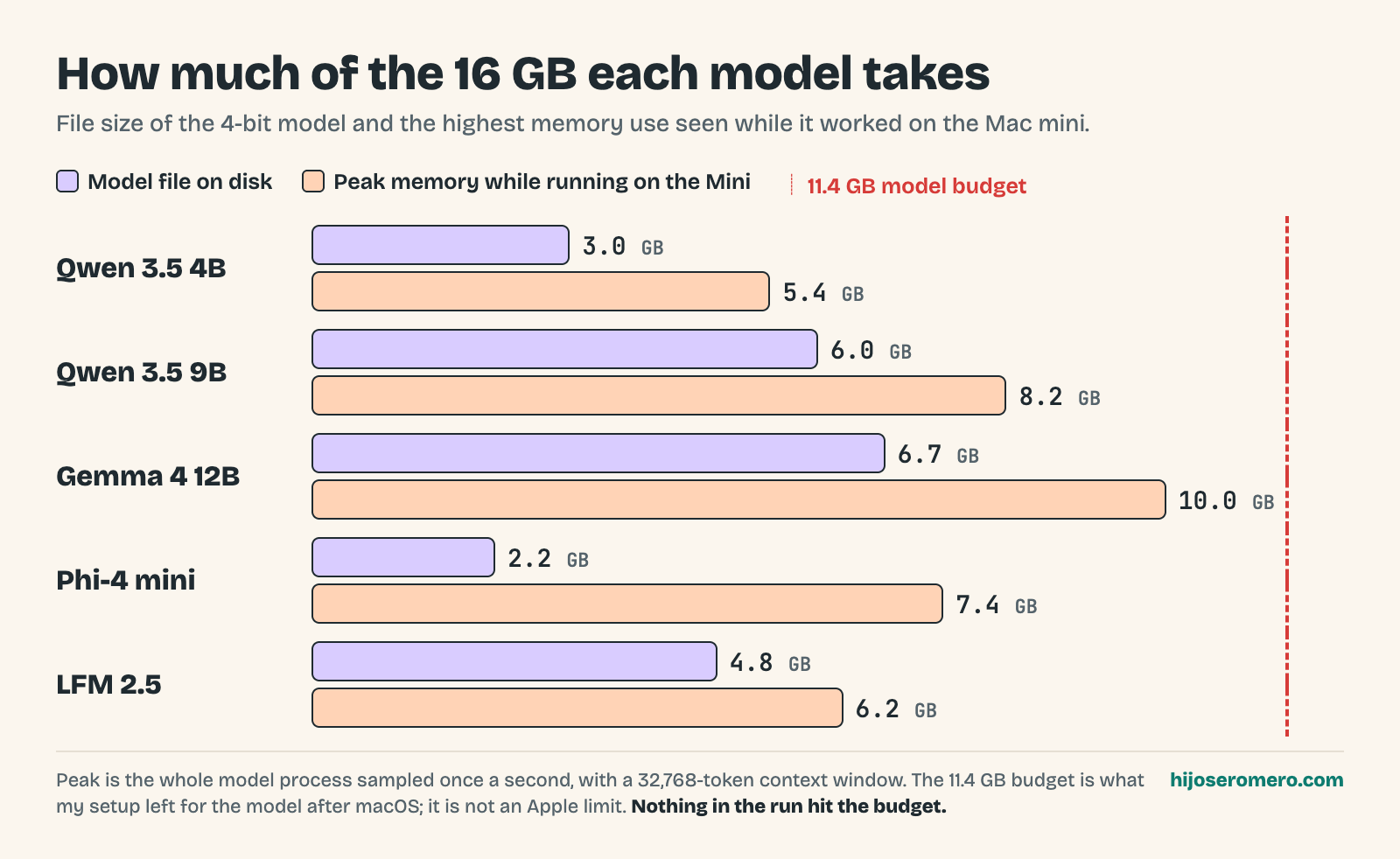
Memory is the whole game on this machine. The 16 GB is shared with macOS, your apps and your 40 browser tabs. In my setup the Mini had about 11.4 GB for the model. That's my test's number, not an Apple limit.
I ran five small models as 4-bit MLX versions, one loaded at a time: Qwen 3.5 4B, Qwen 3.5 9B, Gemma 4 12B, LFM 2.5 and Phi-4 mini.
The files are small. The 4-bit downloads run from 2.2 GB for Phi-4 mini to 6.7 GB for Gemma 4 12B, and the most memory any of them used while working on the Mini was 10.0 GB, with a 32,768 token context window. Nothing hit the budget.
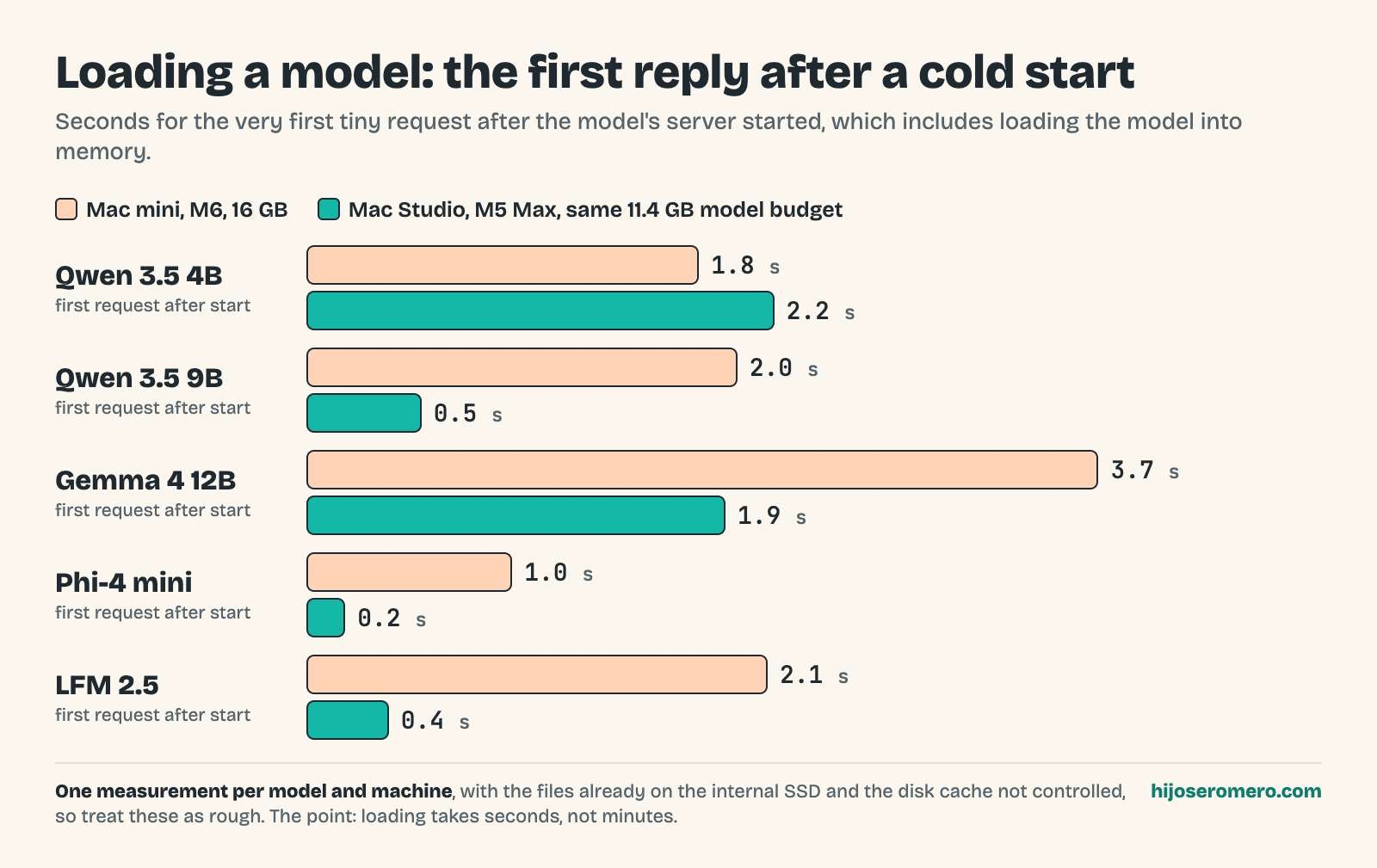
Loading a model is not the problem either. The first reply after a cold start, which includes loading the model into memory, took about 1 to 4 seconds on the Mini. That's one measurement per model, so it's rough, but it's seconds, not minutes.
Fast is not the same as useful
Here's how fast each one writes on the Mini, in tokens per second:
- Qwen 3.5 4B: 49.5
- Qwen 3.5 9B: 29.1
- Gemma 4 12B: 19.3
- Phi-4 mini: 58.7
- LFM 2.5: 121.2
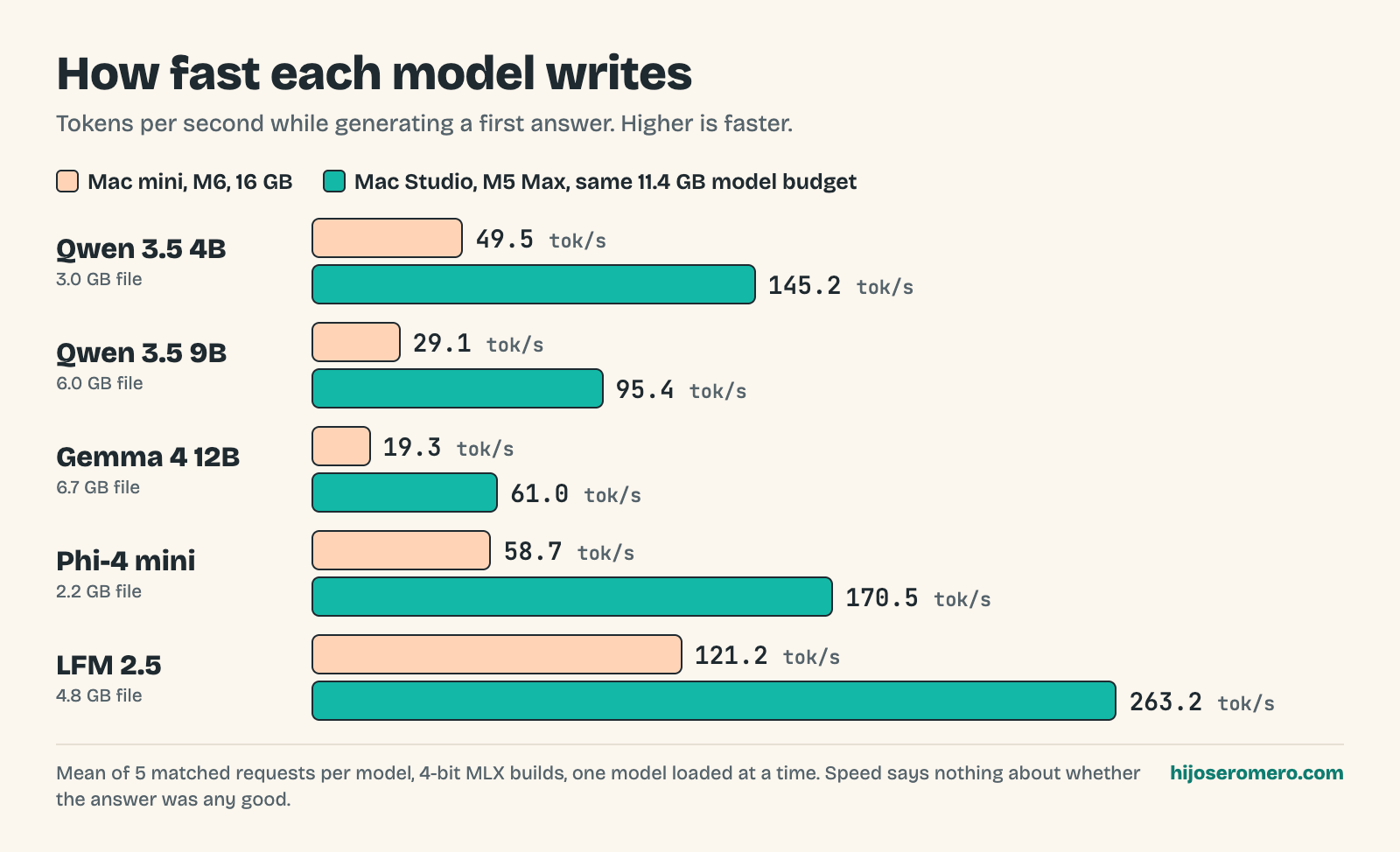
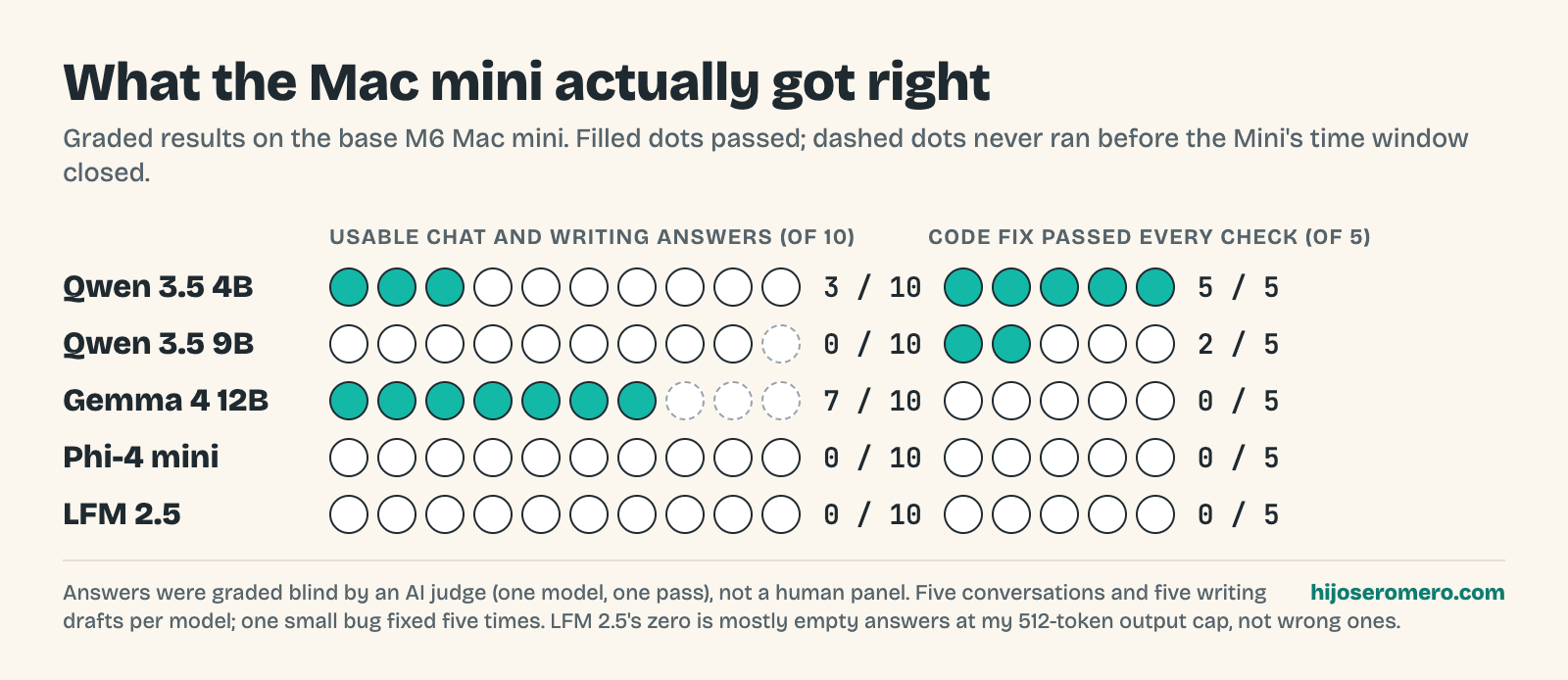
If you only look at that list, LFM 2.5 wins. But I saved the answers and had them graded, and LFM 2.5 got 0 usable answers out of 10. In the video I called that super fast and super wrong.
I have to be more precise than I was on camera. When I read the saved answers, most of them were not wrong, they were empty. LFM 2.5 spent its whole 512 token output budget on hidden reasoning and ran out before it wrote anything: on the Mini, 108 of its 125 requests came back with nothing visible. The judge's note on one of them says it plainly: "The sole assistant output is empty." That may be how this model's reasoning, its chat template and my output cap fit together in my harness, not proof it can't do the job. I didn't raise the cap, switch its reasoning off or retry. With my settings it was not usable. With different settings it might be. Phi-4 mini was the other way around: it answered everything, and the judge rejected the answers for wrong math and made-up details.
Gemma 4 12B was my pick for chat and writing. On the Mini, 4 of 5 conversations and 3 of 5 writing drafts came back usable. Every Gemma answer that existed was judged usable; the misses are three runs that never started before the Mini's time window closed, and I count those as misses. At about 19 tokens per second you're going to watch it type. For a short draft I'm going to edit anyway, that's OK. Day to day it might feel like pulling teeth.
The code fix that surprised me
I gave each model the same small bug five times, using the Pi coding harness for tools. Qwen 3.5 4B fixed it 5 out of 5 times, in about 69 seconds on average. Qwen 3.5 9B, the bigger one, went 2 out of 5. The other three went 0 for 5, and none of them got as far as a wrong patch. LFM 2.5 and Phi-4 mini never called a tool in this harness: one wrote its tool request as plain text and the other described a plan and stopped. Gemma 4 12B listed the files, ran the tests, and then used up its 2,048 token turn thinking before it changed anything. So part of that zero is about how each model fits this particular agent and this output cap.
But it's one bug, five times. That's repeatable, not a senior engineer. The workflow I'd keep is simple: small change, let it run the tests, then you review the diff. Don't hand it your whole repo and go to lunch.
Bigger jobs fell apart
Then I tried jobs closer to real automation: pull info out of documents, build a little website, organize files. With Qwen 3.5 4B on the Mini, documents passed 1 of 5, the website 1 of 5 and folder organization 0 of 5.
Across both computers and all five models, 179 of 200 of these tasks finished enough to get a score. That is not a pass rate. Only 11 of the 200 fully passed: 2 of 100 on the Mini and 9 of 100 on the Studio, all from the two Qwen models. A page can look great and still miss the requirements, so stay close and check the work.
Transcription works, media mostly doesn't
Transcription is where a small local model really fits. On the Mini, Whisper small took about 1.05 seconds per minute of audio and large-v3-turbo about 1.6. Those were short clips, not an hour-long meeting. On five natural clips from one speaker, small got about 9.3% of the words wrong and turbo about 6%. One funny thing: I gave both models pure silence, and both wrote down words anyway, 3 out of 3 times.
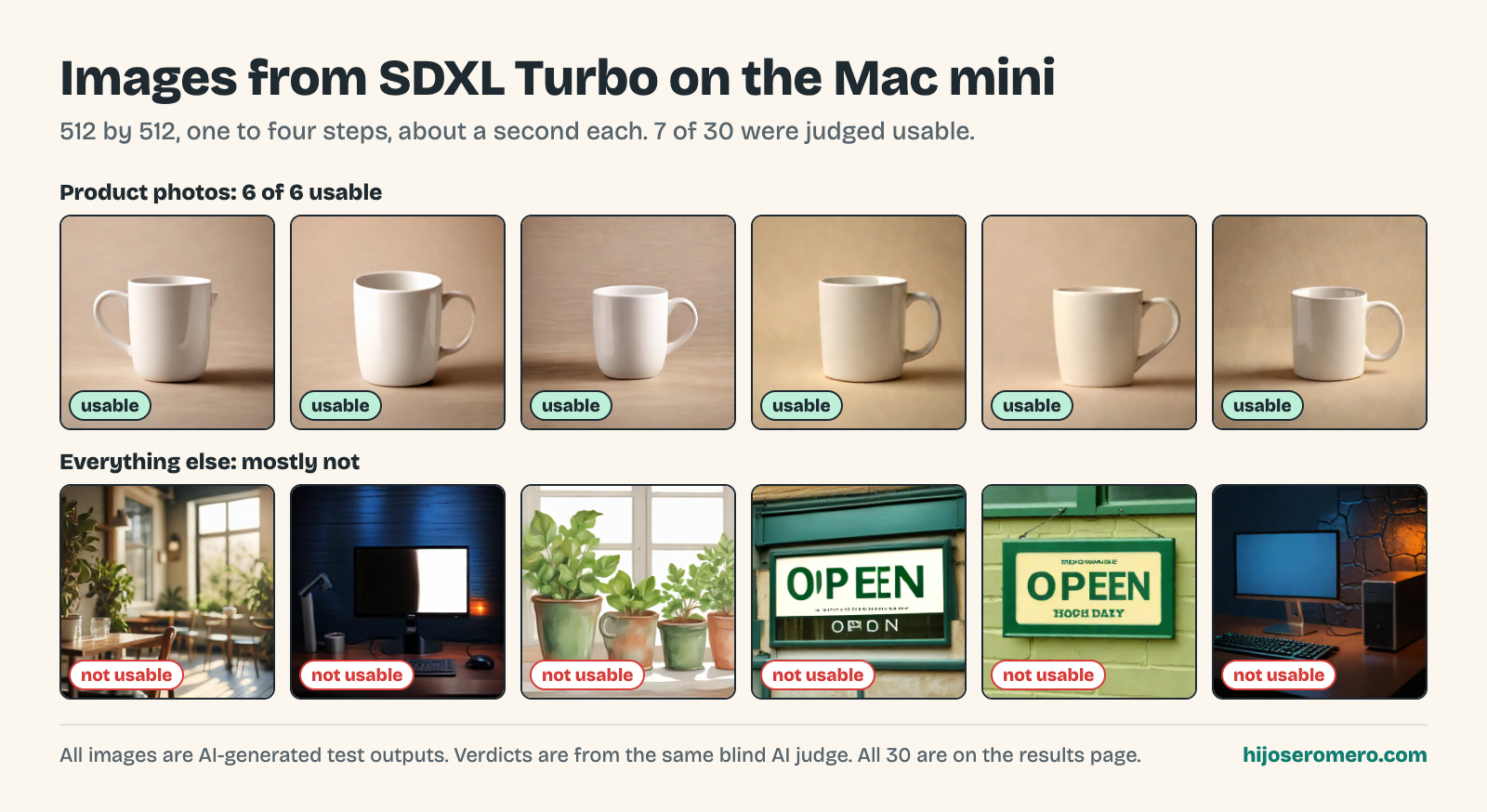
SDXL Turbo at 512 by 512 took about 0.9 seconds for one step and 1.5 for four, not counting model loading. Product photos went 6 for 6 usable, but only 7 of all 30 images made the cut. Editing an existing image went 0 for 15. On camera I said "zero out of five"; the real count is 15 edits, none usable. For video, the agent drove FFmpeg to do edits: 50 attempts across both computers, 8 videos that play, 2 usable, 1 that passed every check.
Mini vs Studio, same budget
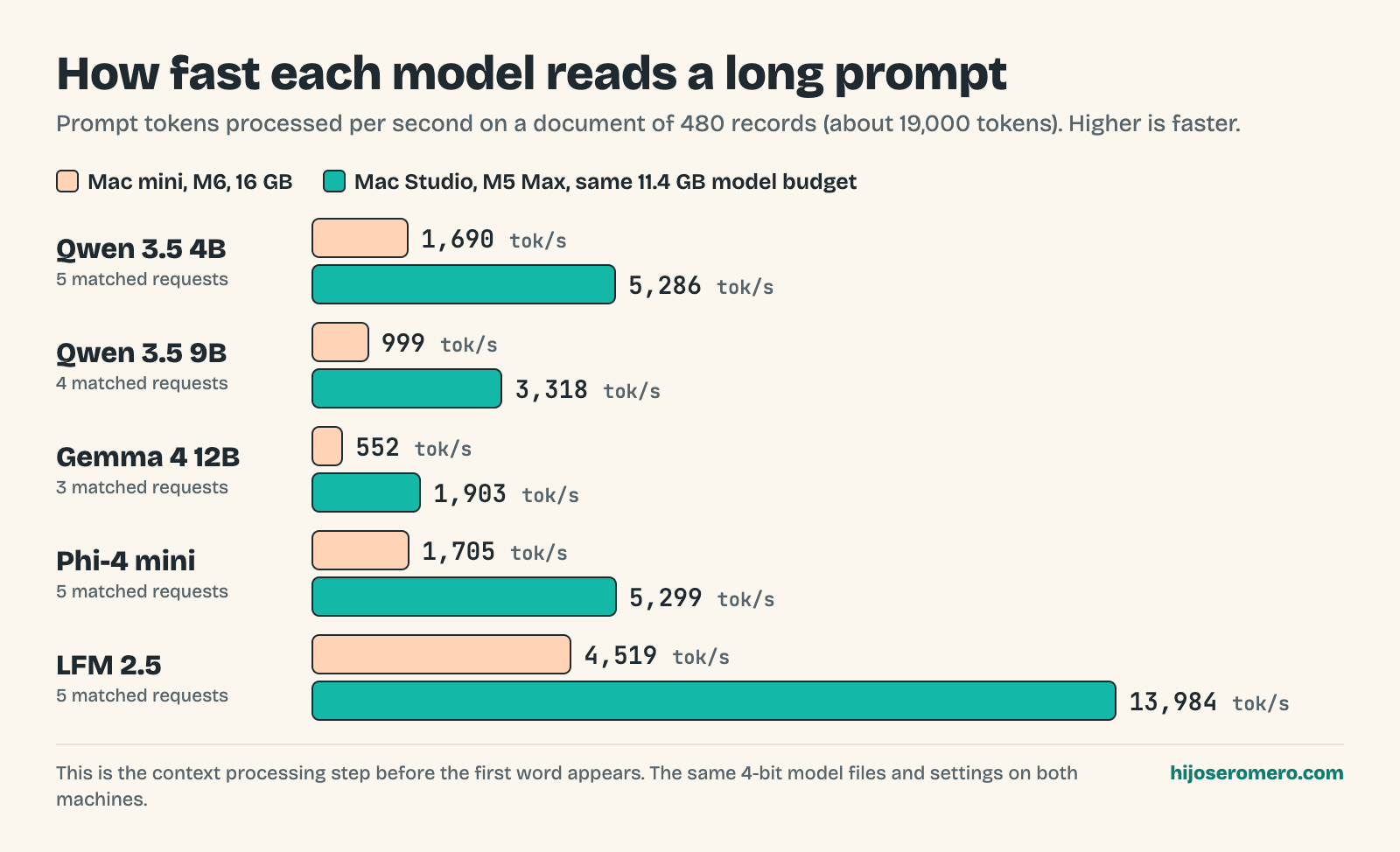
My Studio has an M5 Max and 64 GB, so obviously it would win a fair fight. I handicapped it: the same 11.4 GB budget for the model, the same model files, the same settings. It's a limit we watched, not a hard cap, and the Studio still had extra memory for macOS. So it's the same models and the same budget on a different chip.
The Studio was 2.2 to 3.3 times faster depending on the model. Qwen 3.5 4B went from 49.5 to 145.2 tokens per second and LFM 2.5 from 121.2 to 263.2. Reading a long prompt, a document of 480 records, the gap was 3.09 to 3.45 times across all five. In the video I rounded that to 3.1 to 3.5. Faster doesn't make it smarter, though. Same model, same answers, less waiting.
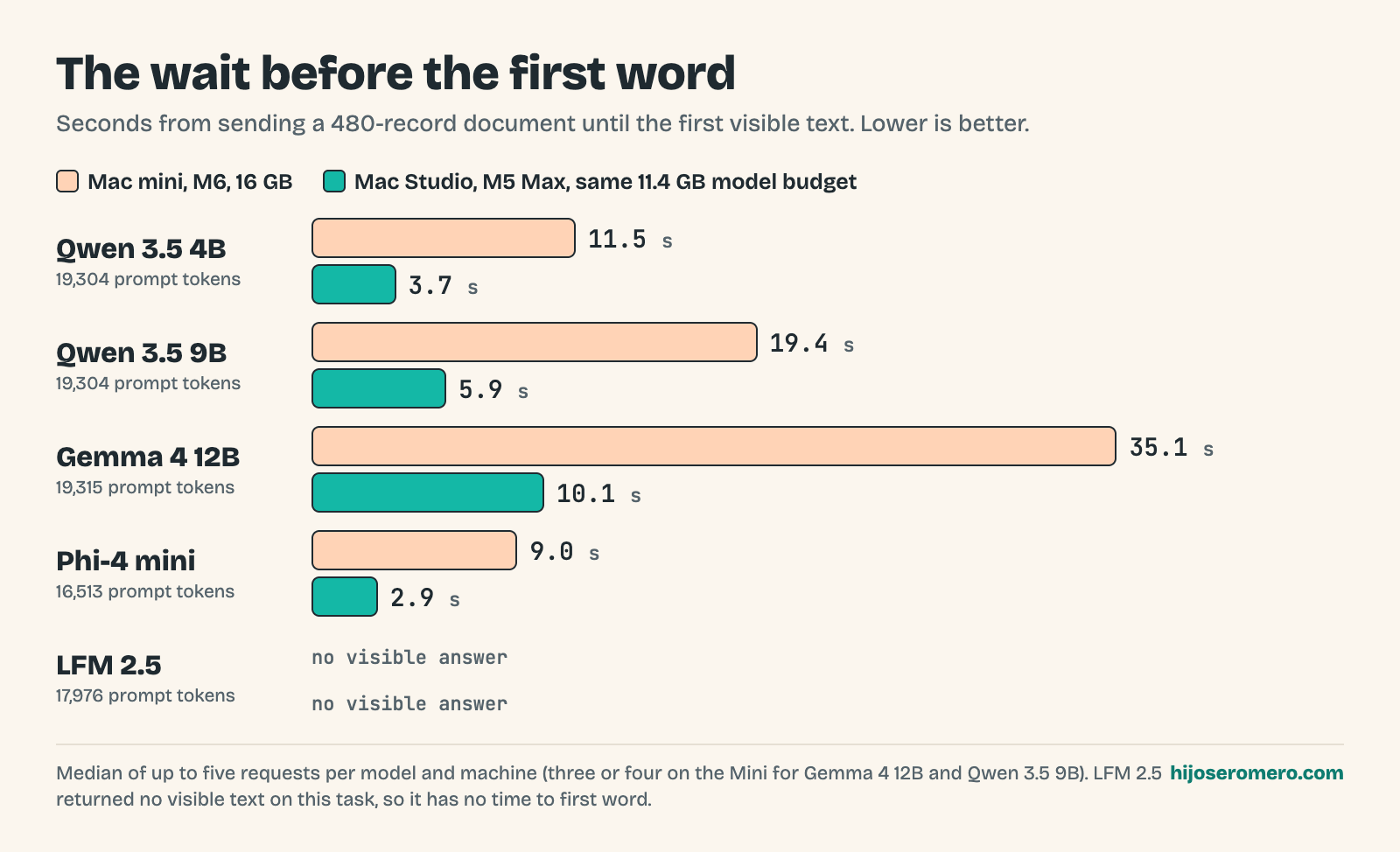
In seconds, that's the wait before the first word. With that 480 record document, about 19,000 tokens, Qwen 3.5 4B took 11.5 seconds to start answering on the Mini and 3.7 on the Studio. Gemma 4 12B took 35 seconds on the Mini and 10 on the Studio. If you plan to feed it long documents, that wait is what you'll feel.
A 30 billion parameter model at 4 bits is about 15 GB just for the weights, already over the Mini's budget. That's math, not a test: I haven't run bigger models on the Studio's full 64 GB yet. My GMKtec EVO-X2 with 128 GB of unified memory (I said 120 in the video) is doing just fine for that, so I'm in no rush.
Nothing in the whole run hit the memory limit, so I can't blame the failures on RAM. The small models just ran out of talent.
So, is it good?
For a few specific jobs, yeah: drafts, transcripts, quick images and small supervised code fixes. I said "unsupervised" on camera and meant the opposite. Pick one job, give one model a very specific task, and keep an example file where you already know the right answer.
If you're thinking about buying one to cancel your AI subscriptions or replace a cloud coding tool, from what I saw it's a no-go. I ended up returning mine. It wasn't enough as my video editing rig, and the local AI promise didn't deliver. To be fair, I didn't test cloud models side by side or do the cost math, and I may be eating my words in three to six months as harnesses and targeted small models get better.
The machine itself is fine. It's snappy, and as a Mac it surprised me for the price, about a thousand bucks. It may be a good buy for Apple's own built-in AI, and people run these as always-on assistant boxes in a closet with a cloud subscription or API tokens, which I think is a great use case. As a dedicated local AI rig, it leaves much to be desired.
If you have a 16 GB Mini, what do you actually run on it?
Sources
- My first look: unboxing the base M6 Mac mini and speed running local AI
- The full results page for this test, with the data to download
- Every graded answer with the judge's notes
- MLX LM on GitHub, the runtime for the five language models
- MLX examples on GitHub, used for Whisper and SDXL Turbo
- Pi on GitHub, the coding harness that gave the models their tools
🎥 Gear links
- Sony a6700 with 16-50mm kit lens
- Shure SM7B dynamic microphone
- Shure MVX2U Gen 2 audio interface
- Audio-Technica ATH-M50x headphones
- ADAM Audio D3V speakers
- GMKtec EVO-X2 AI Mini PC
- Logitech G PRO X Superlight 2 mouse
- NEEWER NL288 LED video light
Affiliate links may earn me a commission at no extra cost to you. As an Amazon Associate I earn from qualifying purchases.