
How Claude Code makes my YouTube videos
A different kind of letter. I opened my YouTube Studio analytics on camera and walked through how the channel got here, then showed the workflow that gets every video out the door. This is the written version, with the parts I skipped on camera because the video was already ten minutes in.
Source files for this video
Everything below is built from these two pages. Open them alongside the letter.
- The slide deck: 29 slides, the ten stages, the edit chain, the publish order and the channel numbers. Fullscreen, arrow keys to move.
- The workflow and skill files: the stage map, the tools, and all ten Claude Code skill files sanitized of anything personal, each with a copy button and a raw .md link. A snapshot from this video, not a maintained page.
The numbers, honestly
I started posting a video every day on July 20 and kept that up for 30 days, through the middle of August. Since then I have posted every other day or so, based on whatever I was into that week. Ninety days in, the channel sits at about 76,000 views and 462 subscribers.
Most of that came from one topic. Qwen 3.8 has been the biggest lifter by far: the video on running Qwen 3.8-Flash-Next at 1-bit on my 128 GB rig is at 17,000 views, and the thinking-levels and quant-ladder videos are right behind it. The surprise was a one-off about switching to a Corne split keyboard because of wrist pain. That one is at 10,000 views and I did not expect it. It is the only hardware video on the channel, so I may go back to that lane.
Local AI is my niche for now. I am not married to it, but it is what I spend most of my free time on, so it is what I make videos about. Monetization is not on yet: memberships need more subscribers than I have, ads need 1,000, and I am about halfway there.
The workflow, before the camera turns on
Everything runs out of one folder with Claude Code, and every video gets its own numbered subfolder. A handful of slash commands do the prep:
- /capture and /ideas keep the idea list. I can send an idea from my phone and it lands in the backlog.
- /research pulls articles from the last 15 to 90 days, takes the links I send it, follows the links inside the links, and tries to get to the primary source of whatever I am about to claim.
- /new-video creates the folder, gives it a number and a name, and drafts the titles and description.
- /slides builds the slide deck (HTML plus Mermaid diagrams) when I need to explain something visually.
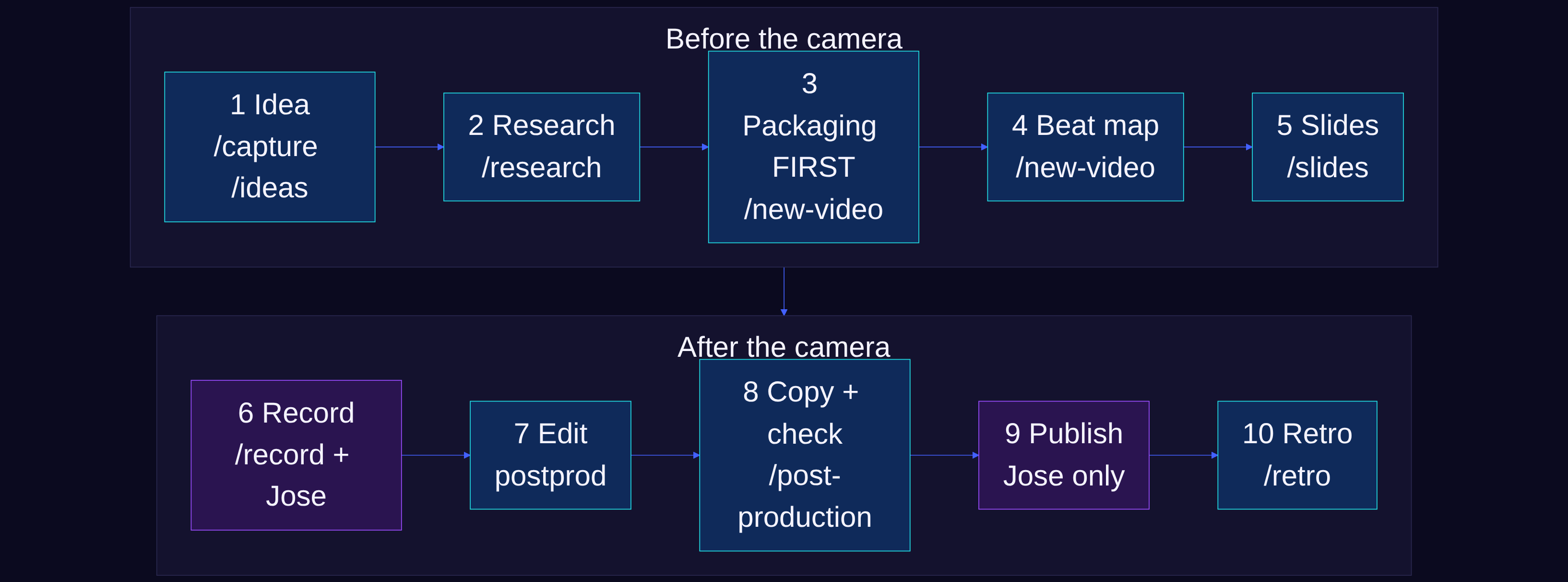
There is also a beat map step that writes the hook and the key talking points. I will be honest: I do not really use it. Sometimes I record part of the video first and build the slides from what I said.
After recording: one command
I record in OBS with a Sony camera and an SM7B, do a take or several, and drop the file on the desktop. Then one post-processing command does the rest.
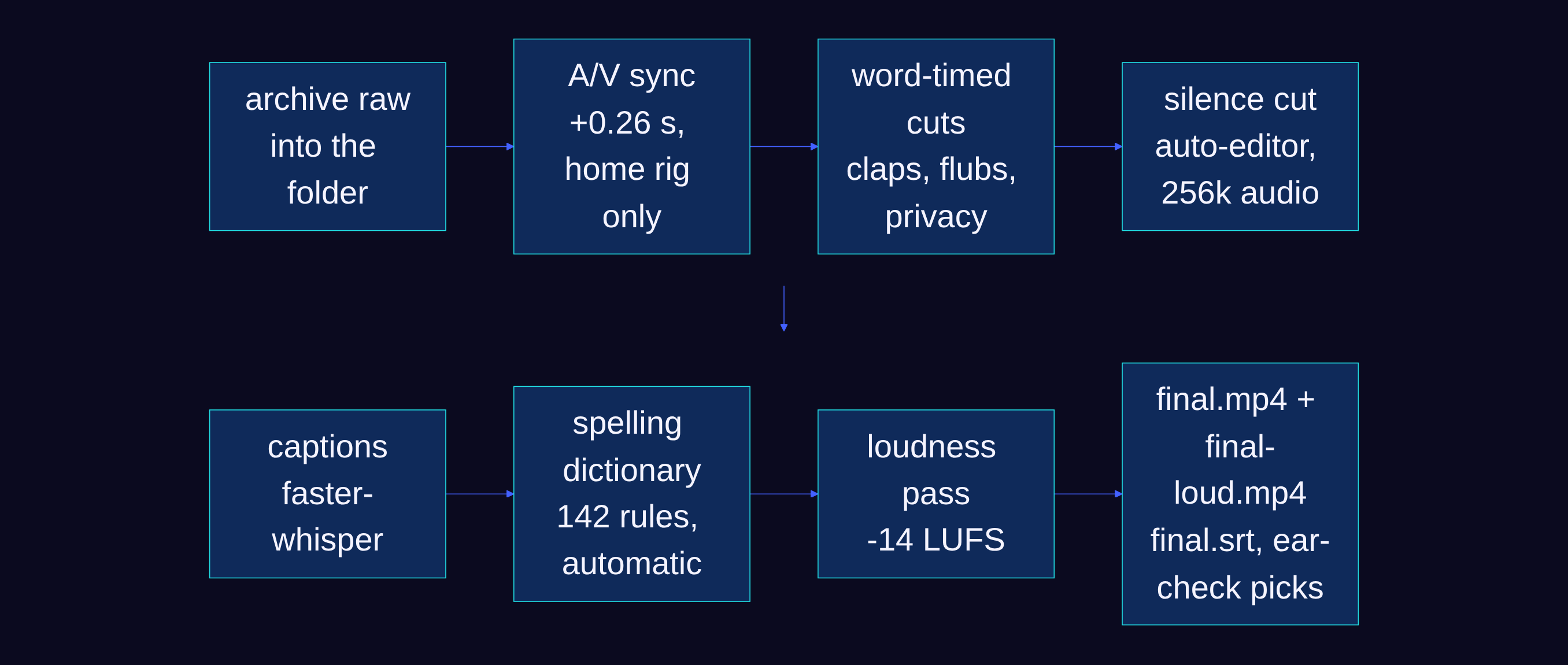
- Copies the raw into the video folder so it is never lost when I clean the desktop.
- Fixes the delay between my camera and my microphone. OBS drifts depending on what else the machine is doing, so the AI measures from my clap at the start and picks the offset instead of me guessing.
- Cuts the dead air, the over-breathing, the ums, and the flubs. If I mess up a section I pause, clap, and restart, and it knows to cut back to that point.
- Runs privacy checks on the screen share so I am not showing more personal information than I mean to.
- Writes the captions with faster-whisper. YouTube's automatic captions get AI model names wrong constantly, so my transcription runs against a dictionary of the names I actually say.
- Renders a second version with a loudness pass for the nights I get tired and my voice drifts low.
That command is the single reason I can put out this many videos. This part used to take me hours, and that friction is what made me stop making videos in the past. It is not perfect, but the small mistake here and there is not enough to make me not publish.
Where it still hurts
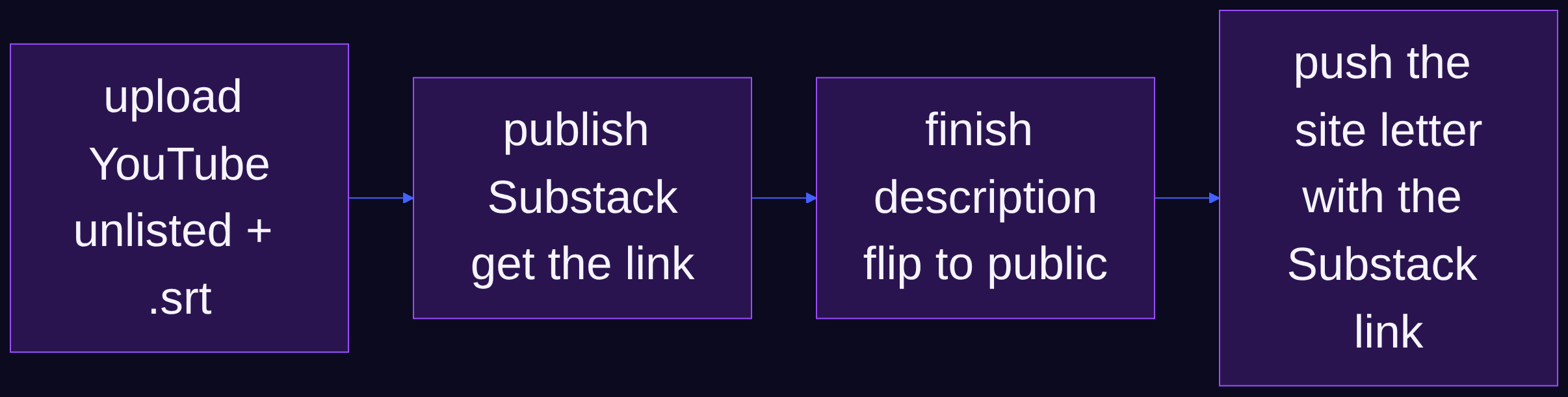
The workflow on paper is ten stages. In practice I am running about six of them. The retro step at the end has never run once. The friction that is left is all the copy-paste: getting the article into Substack, listening to both audio versions to pick one, updating the YouTube description after the links exist.
What is next
I am migrating the annoying parts to Codex. The plan is to record on the Mac, funnel the files to the Strix Halo rig for all the post-processing, and let an agent handle the file shuffling, descriptions, and posting with light oversight. Not overnight on full auto, but something I can run in a side panel while I work on something else.
What is on the desk
The current setup, since a few of you asked. A proper setup-upgrade video is coming later; this is what the videos are recorded on today.
Gear in this one
- Sony Alpha a6700 with the 16-50mm kit lens (the camera)
- Shure SM7B (the mic in every video)
- Cloudlifter CL-1 (clean gain for the SM7B)
- Focusrite Scarlett Solo 4th Gen (the interface)
- ADAM Audio D3V monitors
- Audio-Technica ATH-M50x headphones
- Logitech G PRO X Superlight 2 mouse
- ALTSON 60 LED portable light, CRI 97+ (the key light)
- GMKtec EVO-X2, Ryzen AI Max+ 395, 128 GB (the Strix Halo rig that does the post-processing)
Some links on this page are affiliate links. If you buy through them I may earn a small commission at no extra cost to you. It helps support the work. As an Amazon Associate I earn from qualifying purchases.
Sources
- The workflow artifact page (snapshot from this video): stage map, tools, and every skill file ready to copy
- Claude Code and OpenAI Codex
- auto-editor, faster-whisper, OBS Studio
- The 17,000-view video: Qwen 3.8-Flash-Next at 1-bit to 4-bit
- The keyboard video